Introduction
The audience represents the set of contacts (referred to as recipients) that an Organization has for receiving Email and/or SMS campaigns.
The audience is also characterized by a schema that represents the structure of custom fields of the recipients it contains, as well as their respective data types. These fields can be of two types: key or non-key.
Audience Schema and Key
The schema is defined by the client during the first audience import made through the Arpoone platform, and is composed of key and/or non-key fields.
The set of key fields of the audience schema is called the audience key.
Specifying the key fields is mandatory when creating a new recipient in the audience.
The audience key is the set of fields that uniquely identify a recipient. Thus, the combination of the values of the fields in the audience key must be unique for all recipients in the audience. It is common to use fields in the audience key that allow identifying an individual, such as a mobile phone number, email, or system identifier.
The values of the audience key fields for a recipient can never be changed through recipient editing methods (update) – this is only possible by removing the recipient and then creating a new recipient with the desired values.
The fields of the audience schema are represented by the fields array in the API endpoints for manipulating recipients.
Recipient Object
A recipient object is represented in the same way across various API endpoints and consists of the following fields:
- set of custom fields - property
fields; - subscriptions - property
subscriptions; - tags - property
tags.
Recipient Fields
The fields field is an array containing the custom fields of the recipient, with objects following a name/value structure:
{
  name: "abc",
  value: "123"
}
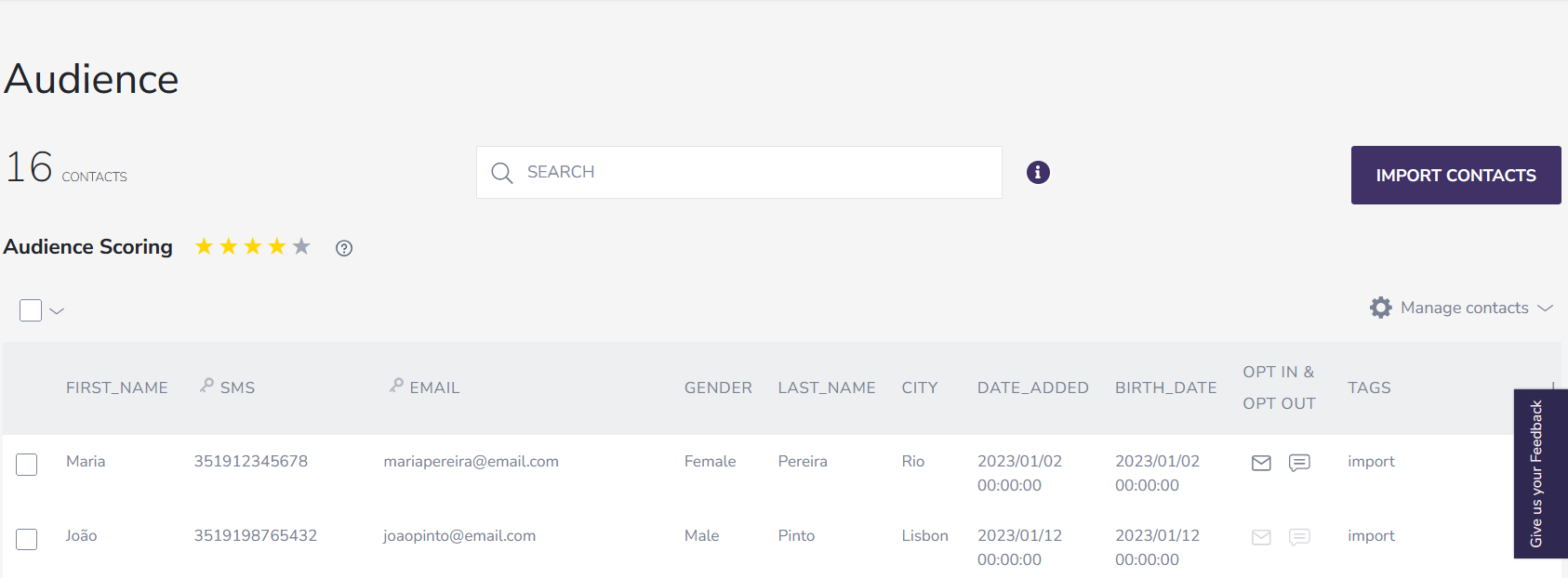
The field name (name) and the data type of value must conform to the audience schema of the organization and can be obtained by accessing the audience page via the Arpoone platform and checking the headers of the table:
Subscriptions
Each recipient in the audience contains the definition of their subscriptions (subscriptions), which represent the channels through which the recipient can receive communications. If desired, a recipient may not have any subscriptions. For example, a recipient with only the SMS subscription will only be able to receive SMS campaigns and not Email.
Subscriptions apply to communications sent to recipients in the audience, such as:
- Marketing Campaign (SMS or Email);
- Automation Campaign (SMS or Email).
Subscriptions can be manipulated by the following methods: automatically, through the Arpoone platform, or through the API:
Automatic
Subscriptions will be automatically updated if the communication recipient takes an explicit action to unsubscribe from campaigns, for example, by clicking an unsubscribe link in an Email campaign.
The Arpoone platform promotes the principle of regular maintenance of audience quality. This is important so that invalid contacts, or those not receptive to marketing campaigns, stop receiving communications. In addition to saving costs, this principle helps improve the deliverability of campaigns to security and anti-spam mechanisms of ISPs and Email service providers (e.g., Google, Microsoft, Apple).
In the case of the Email channel, a previously subscribed recipient will no longer be subscribed in the following scenarios:
- Clicking an unsubscribe link in the email;
- Marking the Email as spam;
- Identification of the Email as a hard bounce.
Via the Arpoone platform
A recipient's subscriptions can be changed via the Arpoone platform by editing a recipient in the following way:
- Access the Audience option from the top menu;
- Select the recipient to modify;
- Access the Opt In & Opt Out section.
Alternatively, a recipient's subscriptions may be reconfigured by re-importing it through the audience import process.
Via the API
A recipient's subscriptions can be changed at any time via the API, using the edit and/or replace recipient endpoints
Tags
Each recipient can have one or more tags specified. These are free-text items that can be used to identify certain recipients and/or segment the audience.
In the context of the API, these are represented by the tags field of a recipient.